
How to Activate JetFormBuilder PRO Addons
JetFormBuilder is a free WordPress plugin that lets you build and style various forms in the Gutenberg Blocks editor. JetFormBuilder PRO addons provide more advanced features and a more proficient form-building experience. This guide leads you from the installation process of JetFormBuilder PRO addons for your WordPress site to handling renewals, migrations, and common errors — so you can ensure everything works smoothly across different scenarios.
Here you can see a summary of the available scenarios and brief instructions on what to do. You might find it helpful as a short checklist for JetFormBuilder PRO addons interaction.
| Scenario | When to Use | Key Actions | Important Notes |
| New Installation | First-time setup | Install plugin + addon manually, activate license on the site | The license button appears only after manual installation |
| Renewal | License expired or is about to expire | Extend the license via the JetFormBuilder account | Discounts apply only to the first purchase |
| Migration | Moving to another site | Check your plan. No limits for unlimited subscriptions; One site at once or a special URL for staging for single-site subscriptions | Depends on your subscription plan |
| Multiple Sites | Applying to several domains | Activate on multiple installs through the account or on the sites | The unlimited plan removes restrictions. Limitations for single-site subscription. |
Table of Contents:
- New Install Flow
- Renewal and Re-Activation of Subscription
- Migrating the License to Another Site and Multiple-Site Activation
- Fixes for Common Activation Errors
- FAQ
New Install Flow
First, when you have successfully logged in to your JetFormBuilder account, click the “Download” button next to the JetFormBuilder Core plugin (if it is not installed yet) and one of the needed add-ons. and click the “Download” button next to the needed addon.
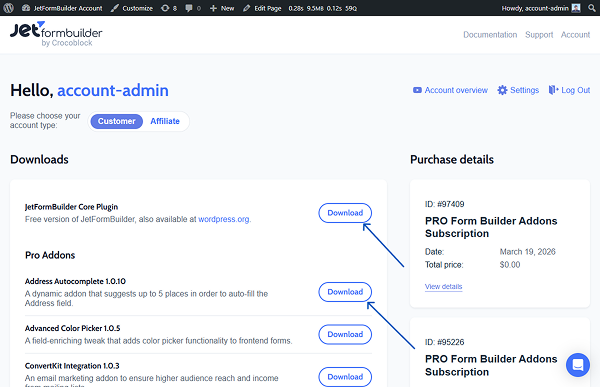
Zip files will be downloaded to your device.
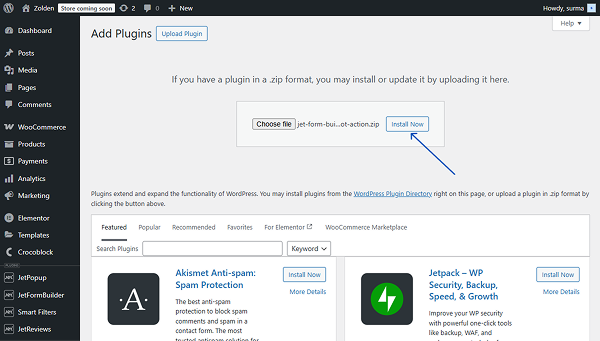
Move to WordPress Dashboard > Plugins > Add New Plugin. Click the “Upload Plugin” and “Choose file” buttons to find the addon you already downloaded.
Once the needed file is selected, click the “Install Now” button.
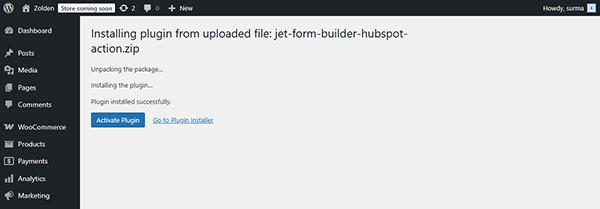
You can also activate the addon right away.
Now, proceed to the WordPress Dashboard > JetFormBuilder > Addons directory and click the “Activate License” button.

The JetFormBuilder license key can be found in your account or in the email you received after registering on the JetFormBuilder website. Copy and paste the license key into the field in the Activate License pop-up.
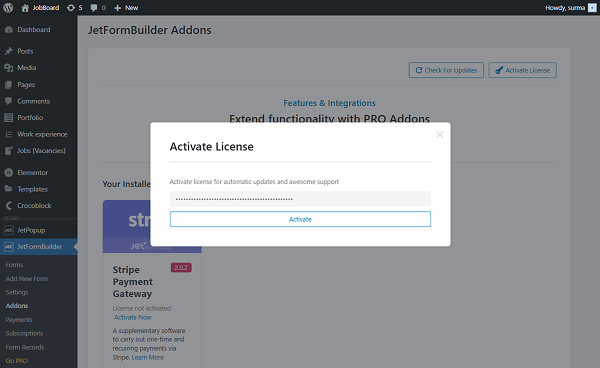
Click the “Activate” button.
Renewal and Re-Activation of Subscription
Automatic renewal is a default option if your license key is still active and there is enough money in a bank account (card or PayPal) attached to your Crocoblock account. You can turn it off if you want.
Automatic renewal proceeds on the day when your license expires. For example, if you purchased a plugin on March 20, 2026, the auto-renewal will be on the same day a year later (March 21, 2026).
The renewals are always for the same fixed price as your initial purchase. All discounts and subscription differences applied at the initial purchase are a one-time privilege and will not count for further renewals. You should have reserved money in your account to get auto-renewal benefits.
In case you need a manual renewal:
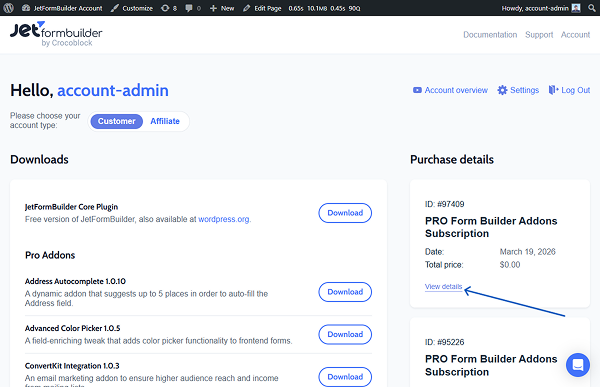
- Log in to your JetFormBuilder account and find the subscription you need to renew
- Click the “View details” button.
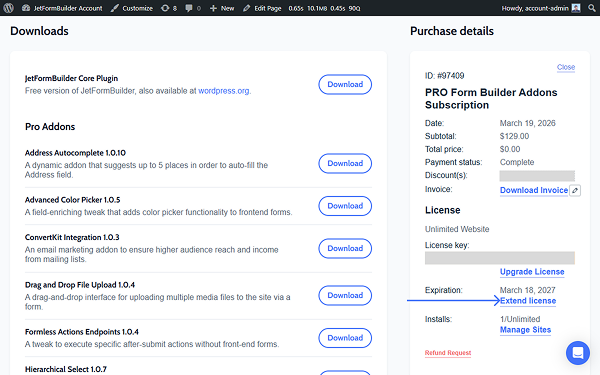
- Next to the Expiration date, click the Extend license link.
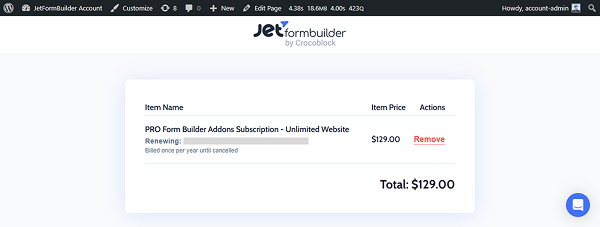
- You will be redirected to the Checkout page with a description of the subscription you are renewing.
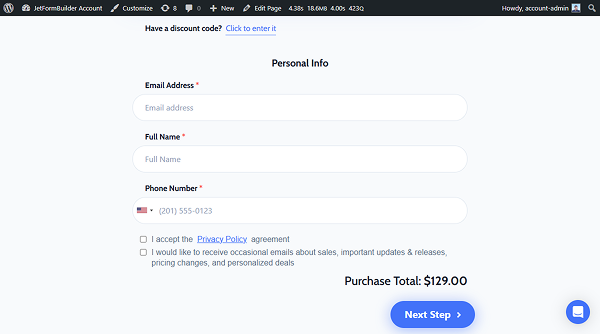
- The Checkout page has the following fields to fill in: the discount code (click the link “Click to enter it” if you have the discount), personal info (Email Address, Full Name, and Phone Number). The last step is to tick the I accept the Privacy Policy agreement checkbox, and you can tick the checkbox for agreement to receive occasional emails about sales, important updates and releases, pricing changes, and personalized deals. Then, click the “Next Step” button. Note that the final price on this page includes the discount if you have it.
Migrating the License to Another Site and Multiple-Site Activation
Check the JetFormBuilder license activation limit of your subscription plan.
If you have an unlimited-sites plan, you can apply the license to any desired number of sites. It is not necessary to deactivate the license from the staging site before migration. However, it is still recommended to remove the license key from the staging site once the site is migrated.
If you have a single-site plan, it means that the license key can be active on one site only once. You have to deactivate the license on one of the sites before migration. Otherwise, if you work with a staging site, ensure that its URL contains one of the following elements, so that a single-site license could be applied to the live and staging sites at once:
- localhost
- 10.0.0.0/8
- 172.16.0.0/12
- 192.168.0.0/16
- .dev
- .local
- dev.
- staging.
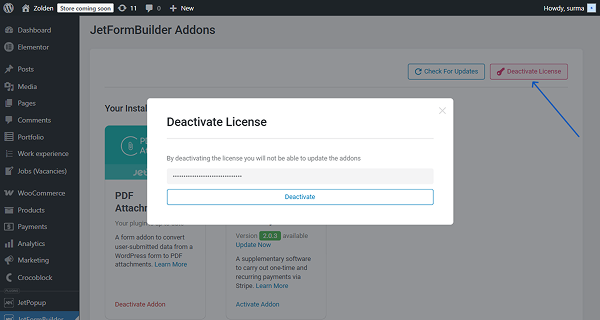
You can deactivate the license on the site where you applied it. For that, proceed to WordPress Dashboard > JetFormBuilder > Addons and click the “Deactivate License” button, and then deactivate the license.
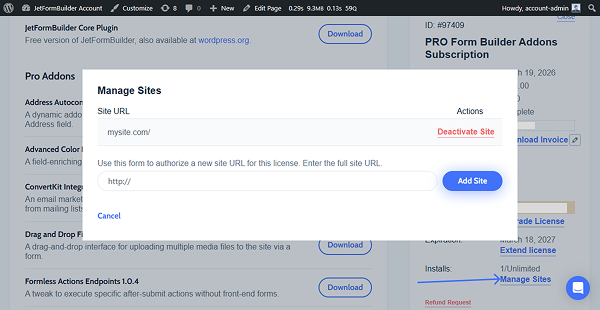
Otherwise, you can deactivate the license from your JetFormBuilder account. For that, view the details of the needed license and next to the Installs field, click the “Manage Sites.” In the newly opened pop-up, you can deactivate the license for the needed sites or add new sites.
Fixes for Common Activation Errors
- The “Activate License” button is not displayed in the Addons section of your site.
It can happen if you have not installed the JetFormBuilder Core plugin and one of the add-ons manually. Refer to step one of this guide to install the JetFormBuilder Core plugin and an add-on manually.
- Error PCLZIP_ERR_BAD_FORMAT
You can get this error while updating the plugins or add-ons. To fix it, refer to the Error PCLZIP_ERR_BAD_FORMAT Cannot Update Plugins troubleshooting guide.
If you get any trouble with license activation, renewal, migration, or deactivation that you cannot cope with, feel free to contact our support team.
FAQ
1. Log in to your JetFormBuilder account.
2. Download the JetFormBuilder Core plugin and the required PRO addon.
3. Go to WordPress Dashboard > Plugins > Add New, click “Upload Plugin”, and select the ZIP file.
4. Install and activate both plugins.
5. Navigate to JetFormBuilder > Addons.
6. Click “Activate License”.
7. Paste your license key and confirm activation.
1. Log in to your JetFormBuilder account.
2. Locate your subscription and click “View details”.
3. Find the expiration section and click “Extend license”.
4. Complete checkout (add discount if available).
5. Fill in personal details.
6. Confirm payment to renew the subscription.
For migrating a single-site license, follow these steps:
1. Go to the current site JetFormBuilder tab > Addons.
2. Click “Deactivate License”.
Alternatively:
1. Open your JetFormBuilder account > Manage Sites.
2. Remove the old domain.
3. Activate the license on the new site.
4. Ensure staging domains follow allowed formats if needed.
Go through the following checklist, and in case nothing helps, contact our support team:
1. Ensure the JetFormBuilder Core plugin is installed.
2. Install at least one PRO add-on manually.
3. Go to the Plugins tab and verify both are active.
4. Navigate to JetFormBuilder > Addons and check if the button appears.
5. If not, reinstall plugins manually via ZIP upload.
6. Refresh the dashboard and try again.
You can use a single-site license on the staging site only if its URL contains one of the following elements:
– localhost
– 10.0.0.0/8
– 172.16.0.0/12
– 192.168.0.0/16
– .dev
– .local
– dev.
– staging.
Otherwise, a single-site license can be applied to one site at a time.
That’s it. Now you know how to download and activate JetFormBuilder PRO Addons on your WordPress site when it is a first installation or renewal, or even if you are migrating the license from site to site.